


An industrial control motherboard is not just a larger PCB with more connectors.
It is usually the control center inside a machine, kiosk, industrial computer, digital signage system, automation controller, embedded terminal, or other industrial equipment. It has to connect to displays, sensors, storage devices, power inputs, I/O boards, communication ports, cables, and sometimes a full enclosure or system-level assembly.
That is why industrial control motherboard PCB assembly should not start with only Gerber files and a BOM.
A board can be electrically correct and still be difficult to build, test, or integrate if the interface map, test access, connector direction, power input, thermal clearance, or firmware setup is unclear.
For OEM buyers, the useful question is not only, "Can this supplier assemble the PCBA?"
The better question is: "Does the EMS partner understand how this motherboard will be used, tested, installed, powered, cooled, and repeated in production?"
The goal before assembly is simple: make sure the board can be built, tested, repeated, and integrated into the final equipment without avoidable surprises.
An Industrial Control Motherboard Is Not Just a Larger PCB
Consumer electronics boards often live in controlled environments and shorter product cycles.
Industrial control motherboards are different.
They may be used in self-service machines, industrial control systems, factory automation equipment, business displays, edge devices, digital signage, industrial computers, embedded terminals, or machine-side control equipment. This may include embedded motherboards, ITX boards, 3.5-inch SBCs, ATX boards, and custom industrial motherboard form factors used in industrial applications.
That changes the assembly conversation.
The EMS partner is not only placing components on a PCB. The team also needs to understand how the motherboard will behave inside the final system.
A few practical examples:
A right-angle connector may need to face a specific enclosure opening.
A COM port may need RS232 or RS485 configuration, not just a generic serial label.
A display connector may need LVDS or eDP test support.
A heatsink may affect fixture access or component clearance.
A storage interface may need boot testing, not only continuity checking.
A key controller or network chip may need lifecycle review before production.
These are not small details.
They decide whether the industrial motherboard PCBA is ready for real equipment integration.

Interface Requirements Should Be Confirmed Before Assembly
Industrial control motherboards usually carry a dense mix of interfaces.
Depending on the project, this may include HDMI, DP, VGA, LVDS, eDP, USB, RJ45 Ethernet, COM ports, RS232 / RS485, audio, GPIO, M.2, SATA, NVMe, SIM, antenna connectors, expansion headers, or other custom I/O.
These interfaces are not just "features."
They affect layout review, connector orientation, assembly sequence, test access, fixture design, enclosure fit, and final functional testing.
Before PCB assembly, OEM buyers should confirm:
- which display outputs are required and how they should be tested
- whether LVDS or eDP needs a panel, adapter, or test tool
- how many COM ports are used and whether they are RS232, RS485, or another configuration
- whether RJ45 ports need only link confirmation or deeper communication testing
- whether USB ports must be tested for device recognition or specific speed behavior
- whether M.2, SATA, NVMe, or other storage interfaces need detection or boot verification
- whether GPIO, audio, SIM, antenna, or expansion headers are customer-critical
- whether connector direction matches the enclosure, cable path, or test fixture
The production team cannot determine all of this from the silkscreen.
A connector may be visible on the board, but its real function, required test method, and integration priority need to be defined by the buyer.
For industrial motherboard projects, an interface map is not extra paperwork. It is part of making the assembly and test process repeatable.
Connector Type and Orientation Affect Manufacturing
Many industrial motherboards use mixed connector technologies.
Some interfaces are SMT. Some are through-hole. Some may require selective soldering, wave soldering, manual soldering, press-fit handling, or mechanical reinforcement. Board-edge connectors, RJ45 jacks, COM ports, terminal blocks, display connectors, and storage sockets all create different manufacturing considerations.
This is where mixed technology PCB assembly becomes important.
A dense connector area may look fine in the layout but still create issues during production if:
- tall connectors block AOI visibility
- through-hole pins require a separate soldering process
- the connector sits too close to a board edge or mounting post
- a cable cannot be inserted after enclosure assembly
- the test fixture cannot reach the port
- repeated mating force may stress the solder joint or connector body
For OEM buyers, connector information should be part of the RFQ package, not something clarified after the first batch is assembled.
The more connector-heavy the board is, the more important it becomes to align assembly, inspection, and mechanical integration early.
Power Input and Protection Cannot Be Treated as an Afterthought
Industrial control motherboards often have different power assumptions from consumer boards.
Some use DC input. Some support wider input ranges. Some use terminal blocks, ATX-style connectors, barrel jacks, or system-level power modules. Many require protection circuits, grounding points, power sequencing, or specific current capacity in high-load areas.
Power requirements affect both design and assembly.
Before production, buyers should clarify:
- input voltage range
- connector type and polarity
- power supply or adapter assumptions
- grounding and chassis connection requirements
- protection components that cannot be changed casually
- high-current areas that may need thermal attention
- power button, LED, wake-up, or watchdog requirements
- whether load testing is required during functional test
Power problems can be hard to diagnose late.
A board may boot at nominal voltage but behave poorly under the actual equipment power condition. A protection component may be present but unsuitable for the real use case. A high-current connector may pass basic checks but become weak under long operation.
Protection parts are not good places for casual substitution. A TVS diode, fuse, MOSFET, input choke, connector, or power-stage component may look like a small BOM line, but it can decide how the board behaves when the customer plugs it into real equipment.
For industrial control motherboard PCB assembly, power input and protection should be reviewed before the build begins.
Thermal and Mechanical Constraints Affect PCBA Decisions
Industrial control motherboards often work inside enclosures, cabinets, kiosks, fanless industrial PCs, panel systems, or compact embedded devices.
That means thermal and mechanical constraints affect the PCBA process.
The buyer should share mechanical drawings, keep-out areas, heatsink requirements, mounting hole positions, board outline tolerances, connector edge clearances, and component height limits before assembly planning.
Several issues are common:
- A heatsink may interfere with a nearby component.
- A connector may not line up with the I/O panel.
- A tall capacitor may conflict with the enclosure.
- A mounting post may sit too close to a solder joint.
- A board-edge connector may be damaged during depaneling if the panel design is not reviewed.
- A functional test fixture may not fit after a heatsink or bracket is installed.
These are not electrical failures, but they can still delay production.
For industrial motherboards, the PCBA does not live alone. It must fit into a final mechanical environment. If the EMS partner does not understand that environment, the board may be assembled correctly but still fail integration.
Fanless and Embedded Designs Need Extra Thermal Awareness

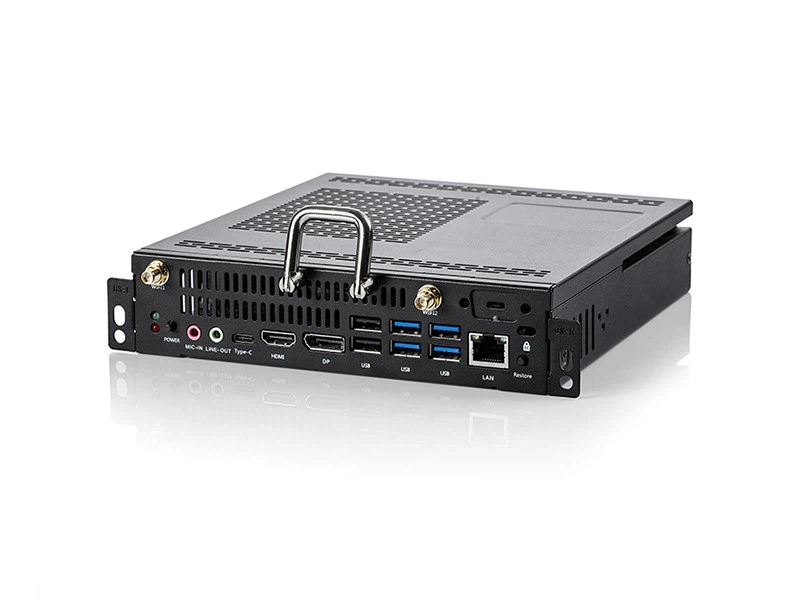
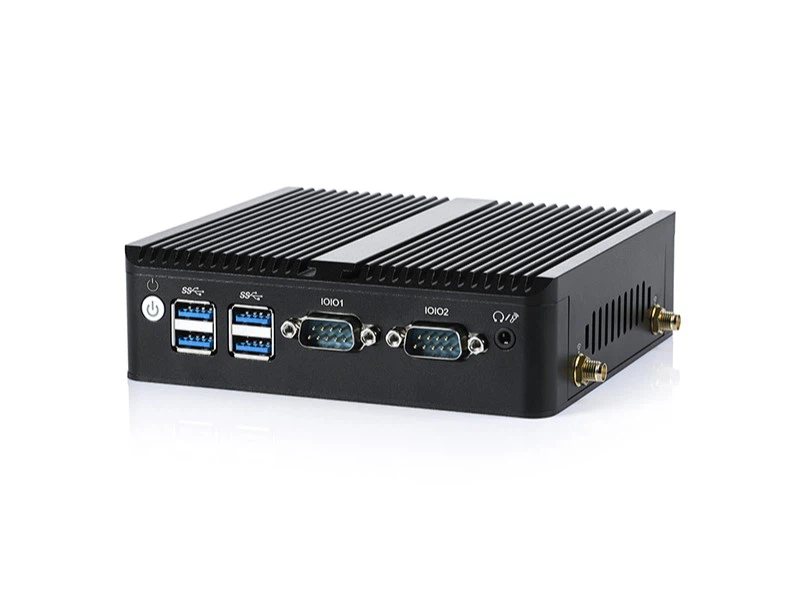
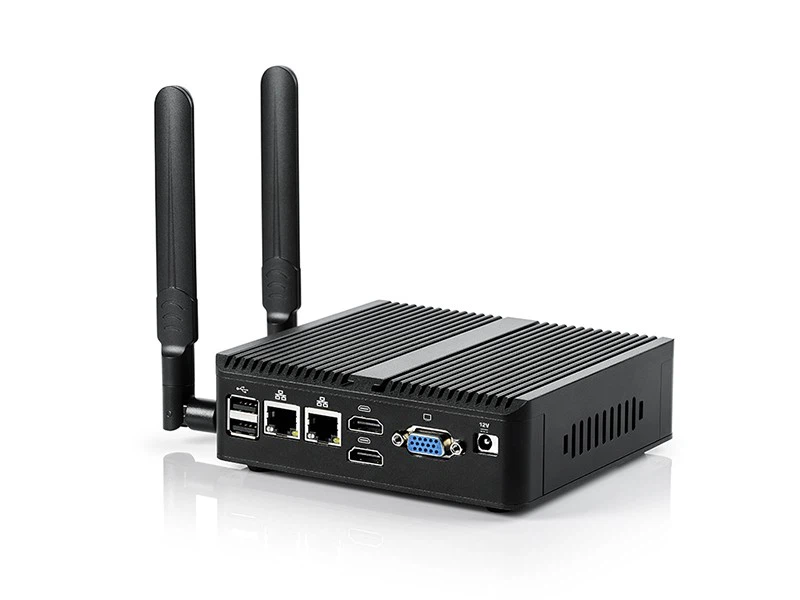
Many embedded motherboards and industrial PC boards are used in fanless or semi-enclosed systems.
In those designs, heat may move through a heatsink, thermal pad, metal bracket, heat spreader, or aluminum housing. The board assembly process has to respect those thermal paths.
Before production, buyers should confirm:
- where thermal pads or interface materials are applied
- whether pad thickness and location are controlled
- whether the heatsink or housing contact area is defined
- whether screws require a specific tightening sequence
- whether thermal materials are included in the BOM or box build package
- whether component height affects thermal contact
- whether the final assembly needs a load or thermal check
A short power-on test may not reveal a weak thermal path.
This is why thermal design should not be left until final product assembly. For industrial control motherboards, thermal and mechanical readiness should be part of the PCBA review.
BOM Control Matters More in Long-Life Industrial Projects
Industrial control motherboards often stay in production longer than consumer electronics.
That means BOM control matters more.
A board that works well as a prototype can still become difficult to produce if the CPU platform, chipset, LAN controller, Super I/O chip, memory, storage device, connector, or power component becomes unavailable or changes unexpectedly.
Before PCB assembly, OEM buyers should review:
- manufacturer part numbers
- lifecycle status of key components
- long-lead or single-source parts
- approved alternates
- memory and storage sourcing rules
- network controller and I/O controller availability
- connector and cable sourcing risk
- substitution approval process
- traceability requirements for critical parts
The important point is not to freeze every component forever.
That is rarely realistic.
The important point is to avoid uncontrolled substitutions. A component may match the footprint but behave differently in temperature, power, firmware, driver, signal integrity, or long-term availability.
For industrial motherboard PCBA, component sourcing should support repeatable production, not just one successful sample build.
Firmware, BIOS, and Configuration Should Be Production-Ready
Industrial control motherboards often depend on more than hardware assembly.
BIOS settings, firmware version, boot device, storage image, driver package, COM port mode, LAN configuration, watchdog behavior, display priority, and customer application environment may all affect whether the board is ready for shipment.
A working engineering sample is not always production-ready.
If only one engineer knows which BIOS setting is required, the production team does not really have a controlled process. If the firmware image is still changing, final testing may become unstable. If the OS image or storage device is not defined, the board may pass assembly but stall before delivery.
Before production, buyers should clarify:
- BIOS or firmware file
- programming method
- boot sequence
- storage configuration
- driver requirements
- test software
- COM mode configuration
- MAC address or serial-number recording
- customer-specific setup if required
For industrial motherboards, configuration control is part of manufacturing readiness.

Testing Should Match the Motherboard's Real Function
Industrial control motherboard testing should not stop at "power on."
The test plan should reflect the real functions of the board.
Depending on the project, this may include AOI, ICT or flying probe, X-ray inspection for hidden solder joints where appropriate, firmware programming, functional circuit testing, display output checks, Ethernet verification, COM port loopback, USB testing, storage boot, GPIO checks, and customer-specific interface validation.
The exact test scope depends on the board.
A simple embedded board may not need the same test setup as a high-interface industrial motherboard. A prototype may use flying probe and bench-level functional checks. A repeat production project may justify more structured fixtures and test records.
The key question is:
What must be proven before shipment?
For many industrial motherboard projects, useful functional checks may include:
- power-on and boot confirmation
- display output through HDMI, DP, VGA, LVDS, or eDP
- Ethernet link or communication verification
- COM port loopback for RS232 / RS485 where applicable
- USB port recognition
- storage detection and boot sequence
- firmware or BIOS programming verification
- watchdog or control function where required
- customer-defined I/O or interface test
A test that only confirms the board turns on may be too weak for a motherboard that controls real equipment.
Testing should match the board's role in the system.
Test Access Should Be Reviewed Before the Layout Is Locked
Some test requirements cannot be added easily after the PCB layout is complete.
ICT, flying probe, fixture-based FCT, and programming may all depend on test points, connector access, fixture clearance, board support, and mechanical layout.
If test access is poor, the EMS partner may need more manual checks, slower troubleshooting, or a reduced test scope. That can affect cost, lead time, and delivery stability.
Before PCB assembly, buyers should confirm:
- whether test points are available for critical nets
- whether programming headers are accessible
- whether display and communication ports can be reached in the fixture
- whether heatsinks or connectors block test access
- whether the board can be safely supported during test
- whether the test method is realistic for the production quantity
Design for testability is not only an engineering preference.
It affects whether the board can be tested efficiently and repeatedly in production.
A Practical RFQ Checklist for Industrial Control Motherboard PCBA
To get an accurate quotation and a smoother production launch, OEM buyers should provide more than Gerber and BOM files.
A useful RFQ package may include:
|
Area |
What to Provide |
|
PCB files |
Gerber or ODB++, drill file, stack-up if available, PCB revision |
|
Assembly data |
BOM with MPNs, approved alternates, pick-and-place file, assembly drawing |
|
Interface map |
HDMI, DP, VGA, LVDS, eDP, USB, RJ45, COM, GPIO, M.2, SATA, NVMe, antenna, SIM, storage |
|
Power input |
Voltage range, connector type, polarity, protection notes, grounding requirements |
|
Mechanical data |
Board outline, mounting holes, I/O panel drawing, enclosure constraints, keep-out zones |
|
Thermal data |
Heatsink requirements, thermal pad locations, component height limits, airflow or housing contact notes |
|
Firmware/configuration |
BIOS, firmware, OS image, boot device, programming method, COM mode |
|
Test requirements |
AOI, ICT or flying probe, FCT, X-ray if needed, interface test method, pass/fail criteria |
|
Acceptance criteria |
IPC class or customer-specific workmanship requirements where applicable |
|
Labeling |
Serial number, MAC address, configuration label, customer label position |
|
Packaging |
ESD packaging, accessories, carton requirement, protection method |
|
Traceability |
Batch record, test record, firmware record, rework and retest rule |
This is not a universal checklist for every project.
It is a way to prevent assumptions from becoming production delays.
If a requirement affects fit, function, test, sourcing, or shipment, it should be clarified before PCB assembly starts.
Where STHL Fits in This Discussion
For OEM buyers preparing industrial control motherboard projects, Shenzhen STHL Technology Co., Ltd. can review the build from a practical EMS and PCBA manufacturing perspective.
Depending on the project, this may include PCB Assembly process review, Components Sourcing support, test access discussion, Testing and Inspection planning, interface-related functional test review, firmware or programming input review, mechanical constraint review, labeling, packaging, and traceability expectations.
The goal is not to add unnecessary complexity.
A simple board-level project should not be treated like a full system assembly. But an industrial control motherboard should not be treated as a generic consumer PCB if the final product depends on display output, industrial I/O, stable power, thermal contact, test coverage, and long-term component control.
Conclusion
Before industrial control motherboard PCB assembly begins, OEM buyers should confirm more than component placement and soldering requirements.
They should confirm interface layout, connector orientation, power input, protection logic, thermal and mechanical constraints, BOM lifecycle, firmware configuration, test access, functional test scope, labeling, packaging, and traceability.
A motherboard can be assembled correctly and still create integration problems later if these requirements are unclear.
The earlier the buyer and EMS partner align on these details, the easier it becomes to move from prototype to repeatable production.
Need support reviewing an industrial control motherboard PCBA project? Submit your files through Request a Quote or contact STHL directly at info@pcba-china.com.


