


EMS product delivery does not end when the PCBA passes testing.
A board, module, or box build unit may be electrically correct and still create trouble for the customer if the packaging is wrong, the label is unclear, the accessory kit is incomplete, the serial number is not recorded, or the wrong cable is packed with the right unit.
That is why packaging, labeling, and accessory control should not be treated as warehouse details. They are part of the delivery process.
For OEM buyers, the useful question is not only "Did the product pass final inspection?"
The better question is: can the customer receive, identify, handle, install, trace, and use the delivered product without confusion?
This matters for PCBA projects, functional modules, industrial controllers, communication devices, HMI panels, power control boards, box build assemblies, and complete electronic products. The more the EMS partner handles after board-level assembly, the more important delivery control becomes.
A finished unit should leave the factory with the right protection, the right label, the right accessories, the right documents, and the right shipment record.
The Delivery Package Is Part of the Product
A finished EMS product is not only the unit inside the carton.
It is the unit, the protection around it, the label that identifies it, the accessories that make it usable, the documents that support receiving or installation, and the records that allow the shipment to be traced later.
That delivery package may include:
- PCBA or finished box build unit;
- ESD bag, tray, foam, or protective insert;
- inner box or outer carton;
- serial number label;
- customer part number label;
- firmware or configuration label where required;
- cable harnesses;
- antennas;
- power adapters;
- mounting brackets;
- screws, washers, spacers, or standoffs;
- gaskets or thermal pads;
- printed documents or quick-start guides;
- packing list;
- inspection or test record where required.
If one of these items is missing or wrong, the product may not be ready for the customer.
That is why delivery control should be planned before the shipping stage, not decided after final test.
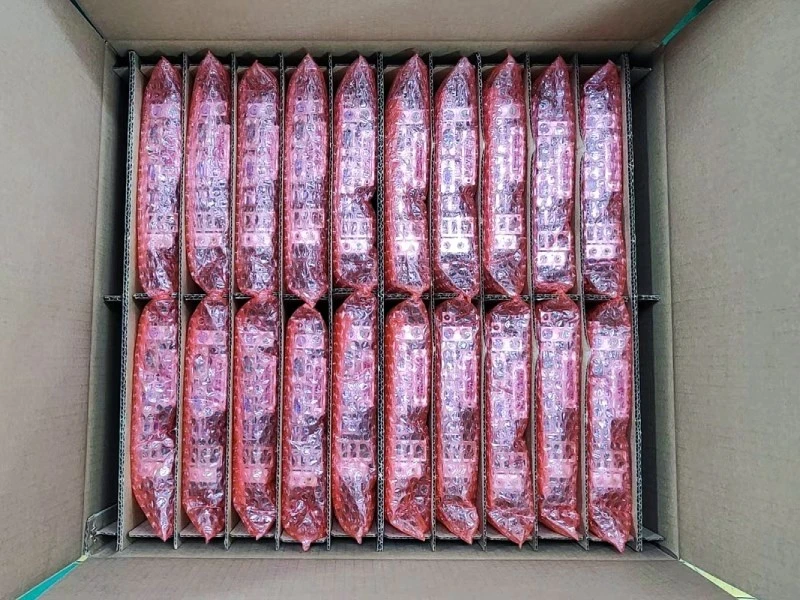
Delivery Problems Are Not Always Manufacturing Defects
A customer complaint does not always begin with a failed solder joint.
Sometimes the product works, but the delivery package creates the problem.
A cable is missing.
A label is unreadable.
A customer part number does not match the purchase order.
A serial number cannot be traced.
A loose accessory scratches the enclosure.
A display arrives with pressure marks.
A connector is damaged during shipment.
Two product variants look similar, but the packing label does not make the difference clear.
These are not classic PCBA defects.
They are delivery control failures.
That distinction matters because many EMS projects now go beyond bare PCB assembly. Buyers may ask the EMS partner to supply modules, cable sets, enclosure-mounted units, programmed devices, or box build products. In those projects, the final delivery package is part of the product experience.
If the product arrives working but confusing, incomplete, or hard to identify, the delivery is not truly ready.
Packaging Should Be Designed for the Actual Product Form
Packaging for EMS delivery should match what is being shipped.
A bare PCBA does not need the same package as a display module, an enclosure-mounted control unit, a programmed gateway, or a box build product with cables and accessories.
The packaging plan should consider:
- ESD protection for PCBAs and electronic modules;
- moisture protection where required;
- cushioning for connectors, displays, switches, and enclosure surfaces;
- separation between units to prevent scratching or impact;
- protection for exposed pins, ports, antennas, and cable exits;
- inner box, tray, carton, or pallet requirements;
- packing direction and stacking limits where relevant;
- whether accessories should be packed with each unit or in a separate kit.
A product can pass final inspection and still be damaged by poor packing.
For example, a PCBA with edge connectors may need different protection than a sealed module. An HMI panel may need protection for the screen and front bezel. A communication device may need extra care around RF connectors or antennas. A power controller may need connector and terminal protection.
The practical question is not only "Is it packed?"
The better question is: will the packaging protect the exact product that is being shipped?
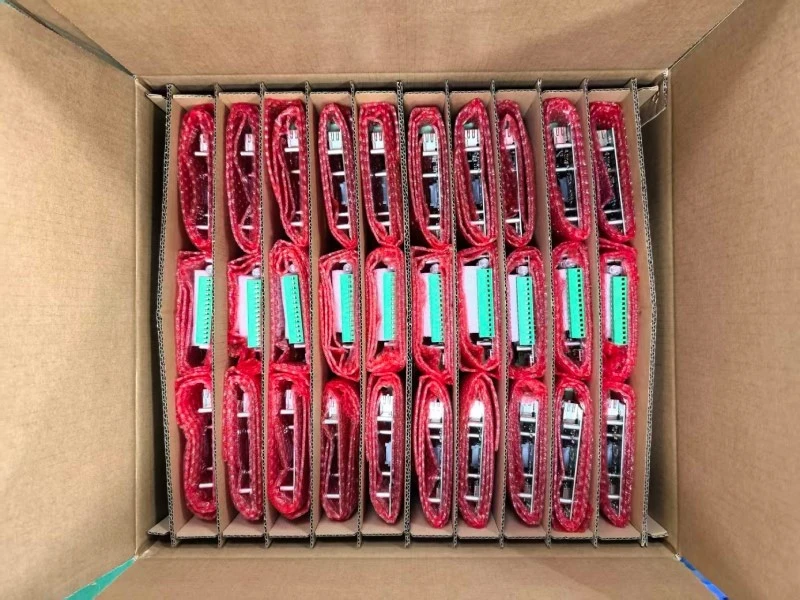
Packaging Constraints Should Be Checked Before Shipment Pressure Starts
A packaging design can protect the product and still create delivery trouble if it does not fit the real shipping plan.
A custom foam insert may protect the enclosure well, but the finished carton may exceed a preferred carrier size. A tray may work for internal handling but not for overseas shipment. Bulk packing may reduce carton count but make the customer's receiving process slower. A mixed carton may seem efficient but create sorting confusion at the customer warehouse.
Before shipment, the buyer and EMS partner should clarify:
- individual packing or bulk packing;
- whether mixed cartons are allowed;
- carton quantity per product variant;
- carrier or forwarder constraints;
- carton size and weight limits where relevant;
- inner protection for finished surfaces;
- whether cartons need customer-specific labels;
- whether serial numbers should be listed by carton;
- whether accessories should be packed per unit or per shipment.
This is not only about logistics.
It is about making sure the product can move through receiving, warehousing, installation, and service without unnecessary handling or confusion.
Good packaging protects the product and supports the next process.
ESD Packaging Should Not Be an Afterthought
For PCBA and EMS delivery, ESD protection is basic but still easy to weaken at the end of the process.
A board can be assembled in a controlled production environment and then handled poorly during packing.
Useful checks may include:
- whether the product needs an ESD bag, tray, foam, or shielding package;
- whether accessories inside the same package are ESD-safe where needed;
- whether labels are applied without damaging the ESD protection;
- whether the bag or tray allows the unit to be identified without unnecessary handling;
- whether the packing operator can scan or check the label before sealing;
- whether unpacking at the customer side is practical.
The package should protect the product without making receiving inspection harder.
If the customer must open every ESD bag just to identify the part number, serial number, or firmware version, the delivery process may create extra handling risk.
Good EMS packaging protects the unit and supports clear receiving.
Labels Are Part of the Product Handoff
A label is not only a sticker.
In EMS delivery, the label is often the first thing the customer uses to connect the shipment to the purchase order, product revision, internal warehouse system, service record, or installation process.
A delivery label may need to show:
|
Label Item |
Why It Matters |
|
Customer part number |
Helps receiving match the purchase order |
|
Product name or model |
Reduces confusion between similar products |
|
Revision level |
Confirms the delivered version |
|
Serial number |
Supports traceability and service |
|
Firmware version where required |
Supports configured products |
|
MAC address or device ID where required |
Supports communication products |
|
Batch or lot number |
Supports production traceability |
|
Quantity |
Supports carton-level receiving |
|
Handling mark |
Supports ESD, fragile, orientation, or moisture control |
Not every project needs every label item.
The label should match the buyer's actual receiving, installation, and service process.
A label that looks neat but does not match the customer's system can still create problems. A serial label placed under a bracket or inside an enclosure may be useless after installation. A carton label that does not show the customer part number may slow receiving. A firmware label that is not tied to the test record may create confusion later.
The point is simple: labels should help the next person handle the product correctly.
Labels Should Be Generated from Current Build Data
One common delivery problem is label timing.
A label may be printed before the final accessory list is updated. A firmware label may be prepared before the latest configuration is loaded. A carton label may show a product variant that changed during final packing.
When label data is handled separately from the production record, mismatch risk increases.
A practical label process should clarify:
- who owns the label content;
- when the label is generated;
- which data source is used;
- whether serial numbers are scanned during final test or packing;
- whether the label reflects firmware or configuration status;
- whether accessory changes require a label update;
- whether carton labels are generated after packing confirmation;
- whether the customer needs barcode, QR code, or human-readable format.
For simple PCBA shipments, this may be a basic part number and quantity label.
For configured modules or box build units, label control may need to connect product revision, firmware version, serial number, customer part number, and packing record.
The label should reflect what was actually built and packed, not what someone assumed at the start of the shift.
Serial Numbers Should Connect to Real Records
Serial numbers are useful only when they connect to something meaningful.
For some EMS projects, batch-level traceability may be enough. For others, the customer may need unit-level records that connect serial number, firmware version, test result, accessory set, shipment date, and packing list.
A practical serial number plan should clarify:
- whether each unit needs a unique serial number;
- who creates the serial number;
- where the label should be placed;
- whether the serial number must be scanned during final test;
- whether the packing list should include serial numbers;
- whether cartons should contain serial number ranges;
- whether the customer needs barcode, QR code, or human-readable format;
- whether the serial number connects to firmware, MAC address, calibration data, or test result.
Traceability should not stop at "the batch shipped."
If a customer later asks which units received a certain firmware version, which carton contained a specific serial number, or which accessory kit shipped with a unit, the delivery record should be able to support the answer where required.
A serial number without a record is just a printed code.
Accessory Control Starts with the Delivery BOM
In a pure PCBA order, the BOM usually ends at board-level components.
In a box build, module, or finished product delivery, the BOM should include everything that leaves the factory with the unit.
That may include:
- cables and harnesses;
- power supplies and adapters;
- antennas;
- mounting brackets;
- screws, standoffs, washers, and spacers;
- gaskets;
- thermal pads;
- labels;
- user documents;
- quick-start guides;
- regulatory inserts where required;
- packaging materials;
- customer-specific installation items.
One common failure happens when an OEM assumes basic accessories are "obvious."
They rarely are.
A control panel may require a specific screw type. A communication device may require a defined antenna. A power module may require a certain terminal plug. A gateway may ship with a region-specific adapter. A box build unit may require a customer-specific cable length.
If these items are not documented, the EMS partner cannot reliably kit, inspect, or ship them.
Accessory control begins with a complete delivery BOM.

Kitting Should Be Done by Unit, Not by Memory
Accessories often look simple until one is missing.
A missing screw can delay installation. A wrong cable can make a working product look defective. A missing antenna can stop a communication device from being tested at the customer site.
Effective accessory control should define:
- what goes with each unit;
- what is packed separately;
- whether the accessory kit is checked by part number and quantity;
- whether accessories are shared across variants or product-specific;
- whether substitutions are allowed;
- whether accessories need labels or batch control;
- whether the packing list must show them.
Kitting should not depend on an operator remembering what usually goes into the box.
For higher-risk deliveries, the packing process may require checklist confirmation, barcode scanning, weight check, photo record, or customer-specific verification. For simpler shipments, a controlled packing list may be enough.
The right level of control depends on product complexity and customer requirements.
The principle is the same: the accessory set should be verified before the carton is sealed.
Consigned Accessories Need a Cutoff Plan
Some accessories are supplied by the customer.
These may include branded labels, region-specific adapters, proprietary cables, printed manuals, customer-owned power supplies, licensed modules, or special packaging inserts.
Consigned accessories can work well, but they need clear timing.
Before production reaches final packing, the buyer and EMS partner should agree on:
- who supplies the accessory;
- approved part number or revision;
- receiving inspection requirement;
- minimum quantity required before packing starts;
- cutoff date for arrival;
- what happens if the item arrives late;
- whether partial shipment is allowed;
- whether substitute accessories are allowed;
- how unused accessories are stored or returned.
A production schedule may look stable until one customer-supplied cable or label set is missing.
If the EMS partner cannot complete final packing without that item, the shipment can stop even after the PCBA and final test are finished.
Consigned items should be treated as part of the delivery plan, not as loose materials arriving whenever convenient.
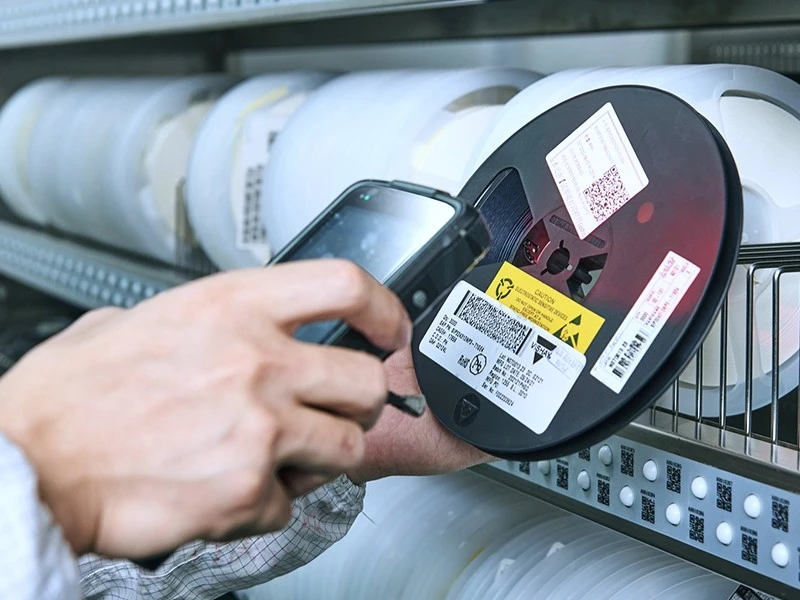
Accessory Traceability Should Match Product Risk
Accessories do not always need the same traceability depth as electronic components.
But some accessories do matter later.
A power supply may need supplier lot control. An antenna may need version tracking. A cable harness may need continuity test records. A printed insert may need revision control. A gasket or thermal pad may affect enclosure sealing or heat transfer.
Accessory traceability may need to connect:
- accessory part number;
- supplier;
- receiving lot;
- product variant;
- serial number or shipment batch;
- packing list;
- inspection or test record where required.
Without accessory-level traceability, a small issue can expand into a much larger containment action.
If the wrong document insert was packed, which units received it?
If a cable batch has a problem, which shipments included it?
If an adapter is changed, which customer orders used the old version?
The record does not need to be heavy.
It needs to answer the right question.
Variant Control Matters When Products Look Similar
Delivery becomes more difficult when several product variants look almost the same.
The PCBA may use the same enclosure.
The label area may be the same.
The cable kit may look similar.
The firmware may be different.
The accessory package may vary by customer, region, or product configuration.
In these cases, final delivery control should make variant differences visible.
Useful controls may include:
- clear part number and revision labels;
- firmware or configuration label where required;
- separated accessory kits where appropriate;
- carton label that matches the exact variant;
- packing checklist for each variant;
- final scan before sealing;
- shipment record that links variant, serial number, and carton.
The issue is not that operators cannot tell products apart.
The issue is that production should not depend on memory or visual guesswork.
If two variants look similar, the packing and label system should make the difference hard to miss.
Packaging, Labeling, and Accessories Affect Each Other
These three areas should not be managed as separate afterthoughts.
A label may depend on the accessory set. A carton size may depend on whether accessories are packed inside the unit box or separately. A serial number record may need to connect the unit, the firmware, the accessory kit, and the carton. A customer label may need to show a product variant that is defined partly by cable type or regional adapter.
For example:
- if the cable changes, the packing list may need to change;
- if the firmware version changes, the product label may need to change;
- if a customer-specific accessory is added, the carton label may need to change;
- if the packaging insert changes size, the carton quantity may need to change;
- if a unit is reworked after packing, the label and packing record may need to be checked again.
The delivery package is a system.
Changing one part of it can affect the rest.
That is why packaging, labeling, and accessory control should be reviewed together before final shipment pressure starts.
Final Inspection Should Include Delivery Readiness
Final inspection should not stop at workmanship.
At the final gate, inspection may also need to confirm that the product is ready to leave the factory as a controlled delivery package.
A practical final delivery check may include:
|
Delivery Check |
What It Helps Prevent |
|
Correct product and revision |
Wrong version shipped |
|
Correct label |
Receiving and traceability confusion |
|
Serial number scan |
Lost unit-level record |
|
Firmware or configuration check |
Wrong programmed variant |
|
Accessory kit check |
Missing or wrong accessories |
|
Visual surface check |
Scratches, dents, pressure marks |
|
Connector protection check |
Port or pin damage during shipment |
|
Packaging method check |
Damage during transport |
|
Packing list check |
Quantity or documentation mismatch |
|
Carton label check |
Receiving delay or warehouse error |
The goal is not to make final inspection heavy for every order.
The goal is to match the final check to the delivery risk.
A simple PCBA shipment may only need ESD packing, label, quantity, and carton check. A configured box build unit may need serial scanning, firmware confirmation, accessory verification, label check, packing list control, and visual surface inspection.
Accessory and Label Changes Should Be Controlled Like Build Changes
A product can be affected by a label or accessory change even when the PCBA does not change.
For example:
- a cable supplier changes the connector style;
- a label location moves after enclosure tooling changes;
- a bracket is replaced with a similar-looking part;
- a firmware label is added for one customer but not another;
- an antenna changes for a wireless product;
- a packing method changes after the first shipment.
These changes may seem minor, but they can affect installation, service, traceability, and customer receiving.
The buyer and EMS partner should agree on which delivery-related changes need approval.
That may include:
- customer label format;
- serial number rule;
- accessory part number;
- cable or antenna model;
- packing method;
- carton quantity;
- documentation included in the package;
- firmware label or configuration label;
- regional or customer-specific kit content.
A stable PCBA build can still create unstable delivery if the accessories and labels change without control.
What OEM Buyers Should Clarify Before Delivery Starts
OEM buyers can help the EMS partner prepare delivery by defining packaging, labeling, and accessory requirements early.
Useful inputs include:
|
Buyer Input |
Why It Helps |
|
Product delivery form |
Clarifies bare PCBA, module, kit, or box build unit |
|
Customer part number and revision |
Supports labels and receiving |
|
Serial number rule |
Supports traceability |
|
Firmware or configuration label |
Supports configured products |
|
Packaging requirement |
Protects the unit during shipment |
|
ESD or moisture protection requirement |
Supports safe handling |
|
Accessory list |
Prevents missing kit items |
|
Cable, antenna, bracket, or screw specification |
Controls product completeness |
|
Customer-supplied accessory plan |
Prevents late consigned-item delays |
|
Packing list format |
Supports receiving and warehouse process |
|
Carton label requirement |
Supports shipment identification |
|
Mixed carton rule |
Prevents sorting confusion |
|
Final delivery inspection requirement |
Defines release criteria |
If these details are not defined until the order is ready to ship, the team may need to rework labels, repack units, rebuild accessory kits, or delay shipment.
That is avoidable.
Delivery control should be planned before the final shipment pressure starts.
Before EMS Product Delivery
For OEM projects, STHL's PCB Assembly, Testing and Inspection, and Box Build Assembly discussions can help clarify practical delivery items before shipment, such as packaging method, label content, serial number control, accessory kits, final inspection scope, and shipment traceability expectations.
The goal is not to make every delivery process complicated.
The goal is to make sure the product that leaves the factory is not only built and tested, but also protected, identifiable, complete, and ready for the customer's receiving process.
Preparing an EMS product delivery package for review? Submit your files through Request a Quote or email info@pcba-china.com.
Conclusion
Packaging, labeling, and accessory control can affect EMS product delivery as much as the final test result.
A PCBA or box build unit may pass inspection and still create customer-side problems if it is poorly protected, mislabeled, incomplete, hard to trace, or packed in a way that does not match the receiving process.
For OEM buyers, the practical lesson is straightforward:
Do not treat packaging, labels, and accessories as afterthoughts.
Define them before shipment pressure begins.
A good EMS delivery package should protect the product, identify it clearly, include the right accessories, support traceability, and help the customer receive and use the product without confusion.


